Billing — Plans, Changes, Cancellation, Refunds
Manage your plan and payment method on the Billing screen in TalkBridge Center. From top to bottom, the screen is ordered [Plan] · [Payment method] · [Invoices], and the way to stop using a plan is at the very bottom.
Plans
| Plan | Monthly price (VAT excluded) | Amount charged (VAT included) | Consultations per month | Per consultation |
|---|---|---|---|---|
| Free | ₩0 (KRW) | ₩0 | 3 in total over 30 days | — |
| Pro 100 | ₩15,000 | ₩16,500 | 100 | ₩150 |
| Pro 300 | ₩45,000 | ₩49,500 | 300 | ₩150 |
| Pro 500 | ₩75,000 | ₩82,500 | 500 | ₩150 |
| Pro 1000 | ₩140,000 | ₩154,000 | 1,000 | ₩140 (7% less) |
| Enterprise | Quote | — | More than 1,000 | — |
- Amounts on screen and in the documentation are VAT-excluded prices, shown together with the actual amount charged (including 10% VAT). Invoice amounts are the actual amount charged, VAT included.
- Free is a trial applied automatically when you sign up. No card registration is required; you can use 3 consultations in total within 30 days, and it does not refill every month. When the period ends or you've used all 3, new consultations stop, and you can continue operating by starting a Pro plan.
- Enterprise is a quote-based plan for operations exceeding 1,000 consultations per month → Contact sales · Support
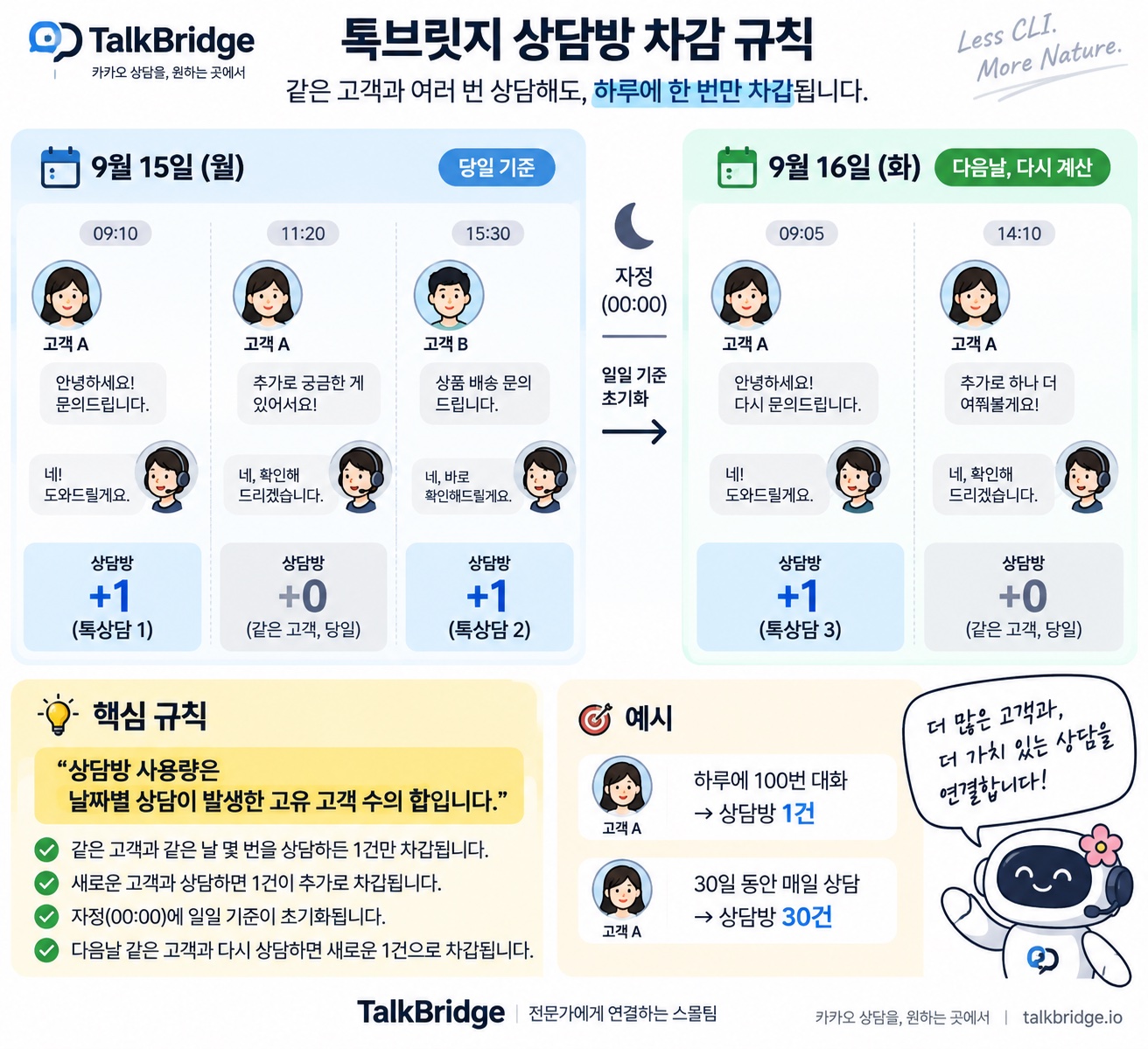
Billing unit — 1 end customer served in a day = 1 consultation
Consultations are counted not by messages but by the day (KST) on which a consultation room was opened. Talking with the same customer several times on the same day counts as 1 consultation. The day boundary is midnight Korea Standard Time (KST), regardless of the account's display time zone. There is no charge per human agent.
Here is the whole rule in one picture.
- There is no billing after the fact. Consultations proceed only within the number included in your plan, and when they're used up, new consultations stop. You are never billed later for what you used.
- Your plan is never upgraded automatically. Even when you've used all your consultations, a higher plan is not charged automatically. You check and decide for yourself whether to upgrade.
- You'll be notified by email when you're close to running out (80%) and when you've used everything → Email Notifications
One plan covers all your brands
To run several Kakao channels, add one brand per channel and connect one of your Kakao Business Channels to each brand. That is how a single account runs N channels → Preparing your Kakao channel
- Consultations are not counted per brand — they are totaled on the one account you signed up with.
- So you do not need N subscriptions just because you manage N brands. One plan on the account, and every brand draws from the same included consultations.
- Conversely, when the included consultations run out, new consultations stop across every brand. The number on the Usage screen is the total across all brands too.
- One thing to keep in mind — customers are identified per channel (brand). A different Kakao channel issues a different user identifier, so even the same person is counted as a different customer on each brand (1 consultation per brand). TalkBridge does not merge customer identities across brands.
- What we support is one business running several of its own brands and channels, up to 5 brands per account.
- Running other companies' brands on their behalf (a reseller setup) is not supported. Plans and usage are totaled on a single account, so there is not yet a way to settle per brand or to separate permissions per client company.
- If you need more than 5 brands, or a setup like the one above, let us know via Support — we handle it through a separate agreement.
Payment method — register a card once, pay automatically every month
Once you register a card, the same plan is charged automatically on each next billing date. You can replace or delete the payment method, and the registered card is used for automatic subscription payments.
Each payment leaves an invoice (number, plan, service period, amount, status). The invoices are your payment records, so there is no separate payment history table.
Change plan
While on a paid plan, you change it in a popup via [Change plan] on the Billing screen or [Change · add plan] on the Usage screen.
Upgrade — pay now and use immediately
- The selected plan's amount is charged immediately, and a new cycle starts today. The next billing date also changes based on today (the confirmation popup shows the new billing date).
- Consultations remaining in this cycle are added to the new plan's count. Example: if you have 40 consultations left on Pro 100 and upgrade to Pro 300, you can use 340 consultations this cycle. The added consultations also expire when the new cycle ends.
Downgrade — takes effect from the next billing date
- Since this cycle has already been paid, you keep using the current cycle as-is, and the lower plan takes effect from the next billing date. Nothing is charged now.
- Until the billing date, you can cancel the scheduled change (you continue on your current plan).
- Consultations remaining in this cycle do not carry over to the next month.
The same plan once more
You can pay for the same plan again only after using up all your consultations ("Change · add plan" on the Usage screen). While consultations remain, only upgrading is possible.
Cancel the scheduled deletion to change plans again → Delete account
Cancel — "If you want to stop using your plan"
Press "If you want to stop using your plan" at the bottom of the Billing screen to open a popup where you choose how to cancel.
Scheduled cancellation — use until the end date, then Free
- You won't be charged from the next payment onward. Until the end date, you can keep using everything as it is now.
- After the end date, the following changes.
- No new consultations are provided.
- Consultations that would consume your quota don't proceed.
- Your integrations stay in place — you won't need to reconnect when you start again.
- You return to Free, but the 3 trial consultations are not granted again.
- If you change your mind before the end date, you can revert with [Undo cancellation]. It returns to the original state immediately, with no confirmation step.
If you only want fewer consultations, use Downgrade instead of cancelling — the popup includes a "Change monthly consultations" link.
Refund and cancel immediately (withdrawal of subscription)
This option appears in the cancellation popup only when both of the conditions below are met.
- Within 7 days of your first paid payment
- Not a single consultation from that payment has been used
Once the refund is processed, the full amount is refunded to the card you paid with, and you switch to Free immediately. Depending on the card issuer, it can take 3–7 business days for the refund to show up. After the refund, no new consultations are provided, and consultations that would consume your quota don't proceed.
A payment that upgrades your plan (Pro → a larger Pro) is treated as a service extension and is not eligible for withdrawal of subscription. Also, once you have upgraded, the first payment can no longer be refunded either.
That's why, if you press Upgrade within 7 days of your first payment without having used a single consultation, instead of charging you we show a "Get a refund first, then pay again for the plan you want" notice. It's a safeguard so you don't lose your right to a refund — the result is the same if you get the refund and then pay for the plan you want.
Refunds and terminations outside the conditions above follow Article 10 of the Terms of Service (Withdrawal of Subscription, Refunds, and Termination). You can view the Terms of Service at the bottom of the TalkBridge Center screen. For individual circumstances, contact Support.
Usage screen
The Usage screen shows how much you can use this cycle and how you've used it.
| Item | Meaning |
|---|---|
Current usage used / total | Consultations used this cycle and the number included. Consultations added by upgrading are included in the total |
| Next billing date | The day automatic payment takes place. "None" if you're on Free or have scheduled a cancellation |
| Expiry | Consultations not used by the next billing date all expire — they don't carry over |
| Free label | "3 trial consultations" — the total you can use within 30 days |
| Usage history | Usage date (KST) and the number consumed that day. Several customers are mixed on the same day, so there is no per-customer breakdown |
- When usage reaches 80%, you're notified by email once (once per cycle). When everything is used, an exhaustion email is sent.
- If no brand is ready to receive consultations, usage shows "–" instead of numbers and the payment buttons are locked ("Available after integration is complete") → Setup Steps
- If you've scheduled account deletion, the scheduled deletion date is shown in the next billing information.